
Most organisations with petabytes of unstructured data see it scattered across multiple storage classes. Using a diskover index can significantly help in managing and organising these vast amounts of data. Regardless of the underlying filesystem, NFS and SMB/CIFS are the most common ways to access network storage.
The Diskover unstructured data management platform improves visibility across all network storage, regardless of location or vendor by indexing your filesystems and giving you total visibility into what data you have, where it lives, and how it’s being used.
This guide walks you through how to index NFS and SMB filesystems with Diskover in minutes.
Why Index Your Filesystems?
Before we go any further, here’s what you will get when you index filesystems with Diskover:
- Complete visibility across all your storage estate.
- Instant search to find files in seconds instead of hours
- Storage analytics show what’s consuming capacity and why
- ROT data identification to find redundant, obsolete, and trivial files
- Cost optimisation opportunities through intelligent data placement
One of our media customers used Diskover to index 400TB of archived footage across multiple NFS shares. Within hours of the first scan finishing, editors could instantly locate specific clips that previously took days to find – turning the archive from a liability into an asset library without the need for a Media Asset Management system.
Ok, let’s get started.
Prerequisites: What You Need
Before indexing NFS or SMB storage, you’ll need:
- Diskover worker nodes installed and configured
- Network connectivity between Diskover workers and the filesystem
- Read access to the NFS or SMB share you want to index
- Sufficient system resources on the worker node
Mounting Your Filesystem
Diskover workers need to mount the filesystem before they can index it. The mounting process differs slightly between NFS and SMB protocols.
To be clear, Diskover only needs read access on network shares. It will never write or change data. Similarly, unless it’s configured with introspection plugins it will never read the actual “contents”
Omitted: Quotationof the file. Data is secure at all times, Diskover will only store file metadata and at most additional metadata from the file headers.
Mounting NFS Filesystems
You’ll need to:
- Install the necessary NFS client tools on your Diskover worker
- Create a local mount point directory (e.g., /mnt/nfs-share)
- Configure the filesystem to mount automatically on reboot
- Mount the NFS share and verify it’s accessible
Mounting SMB/CIFS Filesystems
For SMB/CIFS shares, you should:
- Install CIFS utilities on your Diskover worker
- Create a local mount point directory (e.g., /mnt/smb-share)
- Configure mounting with appropriate credentials and domain settings
- Mount the share and verify accessibility
Once these are mounted, your filesystem is ready for the Diskover worker to scan and index.
Configuring an Index Task in Diskover
Now that shares are mounted to the Diskover worker, we need to configure Diskover to scan them
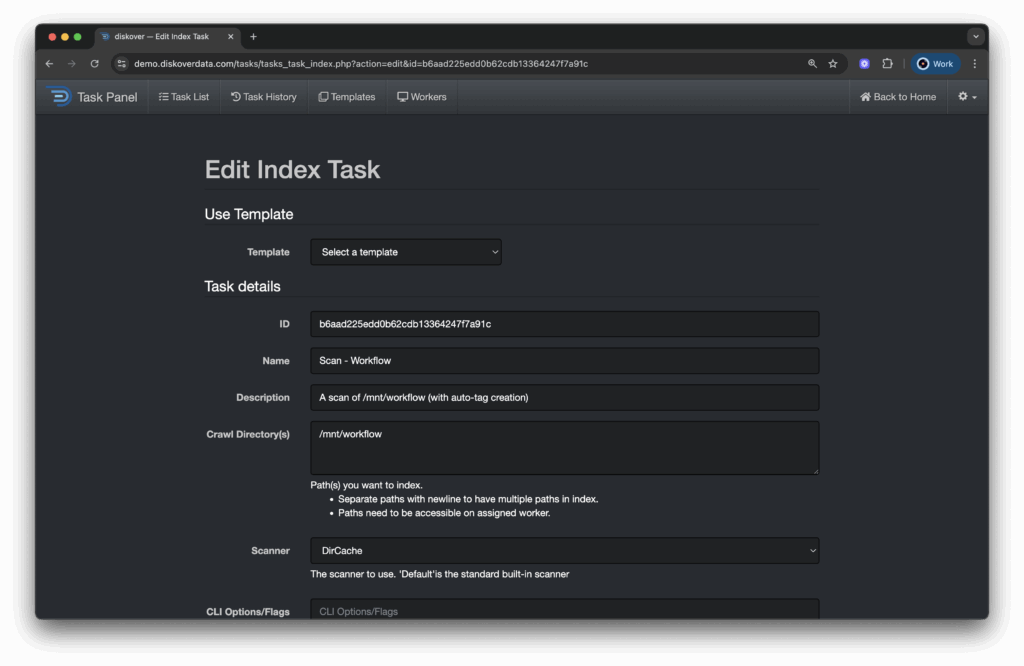
- Navigate to the Diskover Admin > Task Panel
- Click New Index Task
- Configure your index task:
- Task Name: Choose something descriptive (e.g., nfs-marketing-share)
- Crawl Directory: Enter your mount point (e.g., /mnt/nfs-share)
- Scanner: For NAS shares, choose the default
- Worker: Select which worker node should handle this scan
- Index Name: Select Auto Index Name
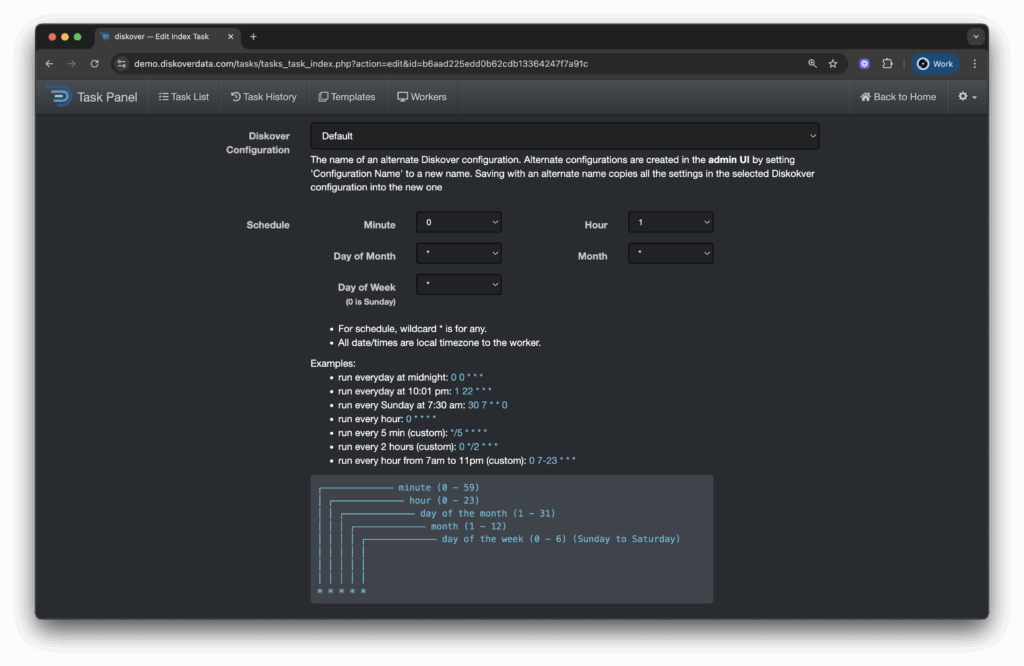
- Schedule: Select how frequently you want the Task to run
Running Your First Scan
With your index configured, kick off the initial scan.
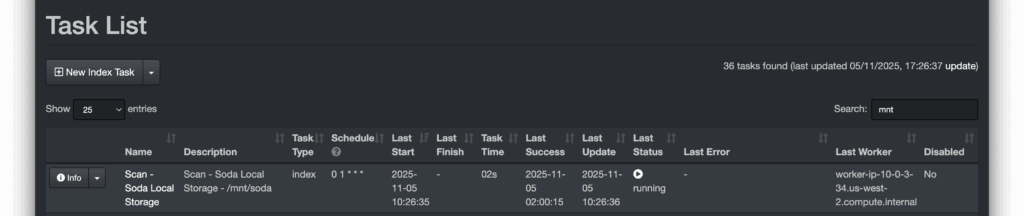
- Go to DiskoverAdmin > Task Panel
- Find your newly created Task
- Click Enable and Run Scan
- Monitor progress in real-time as Diskover indexes your filesystem
The time of your first scan duration will depend on the amount of data on the NAS share and network performance. Most environments complete initial indexing in under an hour, but larger datasets may take longer. Subsequent scans can be sped up, and there are ways to improve scan performance which we’ll cover in a later post.
What You Get: Instant Unstructured Data Intelligence
Once the scanning has completed, you’ll have complete visibility into all filesystems that have been indexes, something traditional storage platforms can’t deliver.
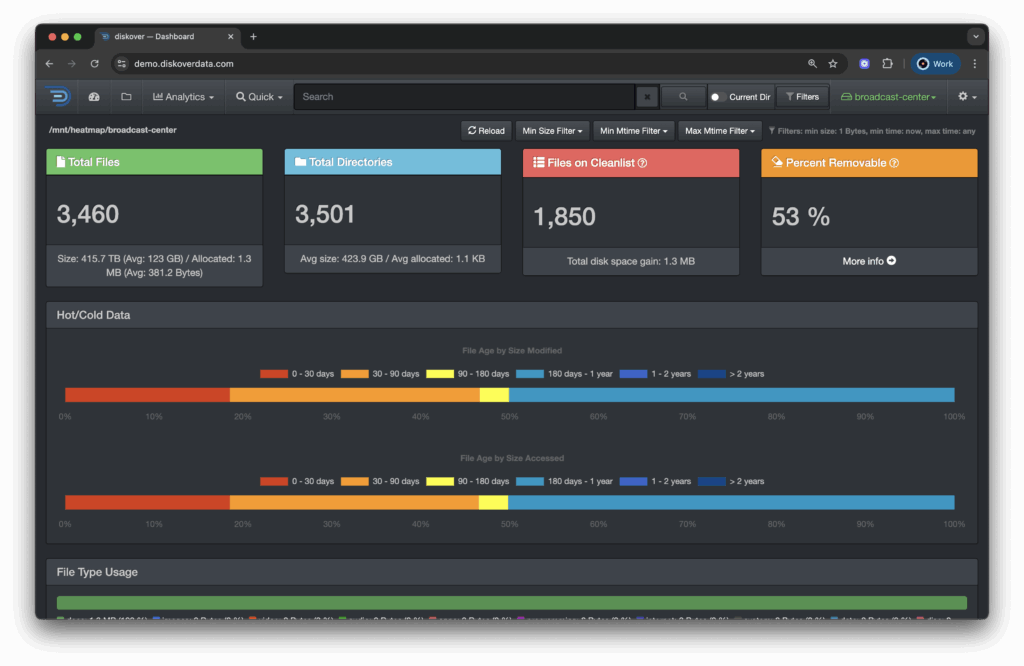
Diskover can now unlock powerful unstructured data management capabilities:
- Search: Find any file instantly across your entire index
- Analytics: See storage consumption, file age distribution, and access patterns
- Cost Analysis: Identify expensive storage and optimization opportunities
- Duplicate Detection: Find redundant copies wasting capacity
- Compliance: Locate files by age, type, or owner for retention policies
With this level of visibility organisations can transform how they manage unstructured data. Marketing can find reusable assets instead of recreating them and IT teams can identify storage cost optimisation opportunities to save thousands every month.
Next Steps: Multi-Filesystem Visibility
Now that you’ve indexed your first filesystem, repeat this process for any other NFS or SMB shares. Diskover’s unified search lets you find data across all filesystems (and other storage platforms) from a single interface – whether it’s NAS storage, object storage, or cloud platforms.
This is where unstructured data management becomes strategic. By understanding your complete data estate rather than managing storage silos independently we let your data create value rather than being a cost centre.
Stop Searching, Start Finding
Organisations who haven’t got proper unstructured data management are wasting 30% of their time hunting for files. With Diskover you can move faster, collaborate better, and turning data into your competitive advantage.
Ready to get visibility across your filesystems? Schedule a demo to see Diskover index your NFS and SMB storage in real-time.
Because in 2025, the question isn’t whether you should index your storage. It’s whether you can afford to keep flying blind while your competition sees everything.